
Basic device settings
Finnish MeshCore settings
Section titled “Finnish MeshCore settings”These are the most important settings. Set them as shown so your messages travel through Finland’s MeshCore network.
| Setting | Value | Meaning |
|---|---|---|
| Radio Preset | EU/UK Narrow | Sets the basic radio parameters: frequency and LoRa modulation. |
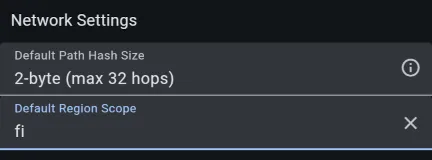
| Default Path Hash Size | 2-byte | Records two bytes per repeater hop to reduce the risk of ambiguity. |
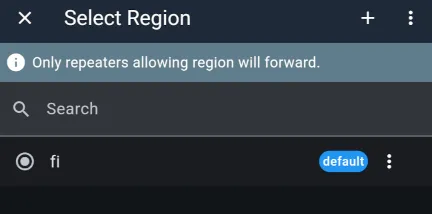
| Default Region Scope | fi | Sends all messages with Finland’s national region scope unless overridden for a channel. |
Configuration step by step
Section titled “Configuration step by step”These instructions use the official MeshCore app. It works the same way on mobile devices and computers.
-
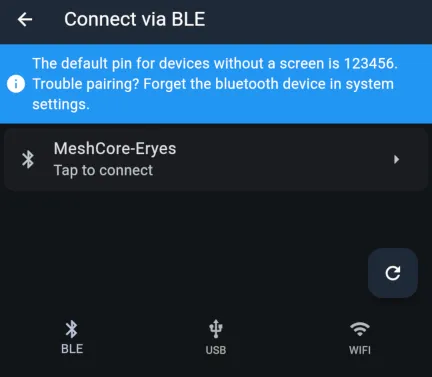
Connect to your companion radio using the Connect button. The bottom bar lets you choose Bluetooth, USB cable or WiFi. If your device has a screen, it displays the Bluetooth pairing code; otherwise, the default code is 123456.
-
Once connected, open the companion radio’s settings using the gear icon that appears where the Connect button was.
-
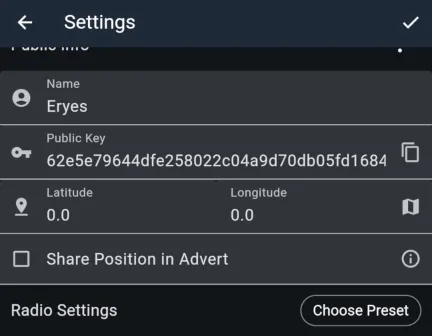
Give your companion radio a name. This is the name others see in channel conversations and private messages. The public key is the address used to route traffic. You do not need to edit it; this guide explains its use later.
-
You can set the device’s location using coordinates, for example if your companion radio will be permanently installed at home. With a known location, the app can show distances to repeaters and other users. Devices with GPS can determine their location automatically; enable this on the ‘Position Settings’ page. To share your location publicly, check ‘Share Position in Advert’.
-
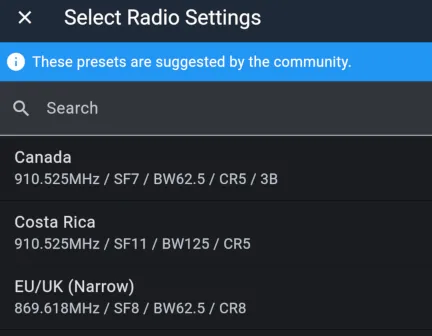
The MeshCore app provides a preset containing the radio settings. Press ‘Choose Preset’ and select ‘EU/UK (Narrow)’. Avoid changing these parameters, as your messages would then fail to travel through Finland’s MeshCore network. The same radio settings are used by MeshCore throughout Europe.
- The remaining important settings are further down. Select ‘Default Path Hash Size’ → ‘2-byte’. Open ‘Default Region Scope’, use the + button to add a value, enter ‘fi’ and confirm. Then select ‘fi’ in the list as shown and choose ‘Set Default’ from the menu at the end of its row.
👍👍 All done! With these settings, you are ready to communicate on Finland’s MeshCore network. The following sections cover the skills you will need, so stick around a little longer 😊