
Basic repeater settings
MeshCore settings in Finland are largely standardised. This page provides a convenient command sequence: copy it, adjust a few values and paste it into the repeater’s command line to configure everything at once. Instructions for the graphical interface are also included, but it cannot configure every setting. The command line is therefore recommended.
You can access the command line:
- In a browser using Repeater Setup on the MeshCore Flasher homepage, with the repeater connected to your computer over USB.
- Through the official app over the radio, either across the mesh or with a direct connection.
- On a computer using meshcore-cli.
Settings to think through and customise
Section titled “Settings to think through and customise”These can be configured in both the graphical interface and the command line:
- Give the repeater a name. It usually refers to the place where the repeater will operate. The choice is yours, but use common sense and good manners.
- Set its location using coordinates.
- Advertising frequency, or Advert Interval, is configured separately for mesh-wide adverts (in hours) and direct adverts heard only within the repeater’s range (in minutes). Every advert consumes battery power, and every flood advert burdens the whole mesh. Read more below.
- Decide whether to forward or restrict messages without a region scope. Finland’s MeshCore community aims to use fi for domestic traffic, separating occasional incoming foreign traffic from the local communication that matters most to us. If allowed, foreign messages are forwarded to everyone in your local mesh, which can sometimes become irritating. They also consume repeater airtime and battery power. Read the detailed explanation.
- Regions to forward: fi in all cases, offgrid if the repeater is independent of mains power, and any locally agreed smaller scopes. At a coast or border where the repeater can support a neighbouring country’s MeshCore network, you can add that country’s national scope to help.
- Transmit power (set tx / Transmit Power (dBm)) must match your hardware: 21 / 22 / 23. Note that 23 dBm may exceed the permitted output power with directional antennas.
Common settings in Finland
Section titled “Common settings in Finland”The settings highlighted in grey are explained below. Replace [nimi] with the name, [leveysaste] with latitude and [pituusaste] with longitude. The commented region examples mean your local area (oma_lähialue), a neighbouring region (naapuri_region) and offgrid operation; replace example region names with locally agreed codes before enabling them.
set name [nimi]set lat [leveysaste]set lon [pituusaste]
set radio 869.618,62.5,8,8set tx 22set dutycycle 10
set path.hash.mode 1set advert.interval 0set flood.advert.interval 47set loop.detect moderate
region put fi# region put oma_lähialue# region put naapuri_region# region put offgridregion put eu# region default firegion save
clock sync| Setting | Value |
|---|---|
| Name & Location … | |
> Name |
(name) |
> Latitude |
(coordinate) |
> Longitude |
(coordinate) |
| Access … | |
> Admin password |
(management password) |
| Radio settings … | |
> Preset |
EU/UK (Narrow) |
> Duty Cycle (%) |
10 |
| Advertising … | |
> Advert interval (minutes) |
0 |
> Flood advert interval (hours) |
47 |
| Regions … | |
> Default region |
fi |
> Home region |
fi |
> Unscoped traffic → Allow Flood |
☑ / ☐ |
| … + Add region | |
> Region name |
fi |
> fi → Allow Flood |
☑ |
| … add other regions the same way | |
| Advanced Settings … | |
> Repeat |
☑ |
- A name is required, maximum 23 bytes. Accented letters and emojis use multiple UTF-8 bytes.
- Set the location in decimal degrees, for example lat
60.172lon24.941. It need not be exact, but keep it within 100 m if possible. To keep the repeater off maps, leave the location unset or set both values to0. - Transmit power can be
22dBm if the antenna’s maximum gain is no more than 5 dBi. With higher gain, reduce the power. - Add these regions:
fi, the national code covering Finland.- Any local region codes. Few are in use yet, but communities are encouraged to agree on them.
- At a boundary, codes for more than one area may be appropriate.
offgridcan be added to repeaters that operate without continuous mains power, using internal batteries or an external UPS. This allows the offgrid mesh’s performance to be tested when needed.
- Default region (
set region default) only determines the scope of the repeater’s own adverts. It has no effect on forwarded traffic. In Southern Finland, we recommendfi; elsewhere, setting it is not currently necessary (October 2026). - The most important thing for now is to add
fi. Read more in Region scopes on repeaters.
Advertising (adverts)
Section titled “Advertising (adverts)”Repeaters advertise their presence at intervals. There are two types, and both can be disabled:
- Zero-hop adverts reach neighbouring repeaters and companion radios within direct range, at intervals of 0–240 minutes. They are not forwarded. Each consumes only the local airtime needed for that one packet. Direct adverts can be useful for repeaters travelling in vehicles.
- Flood adverts travel as far as the mesh reaches, subject to region scopes. Unless disabled, they are sent every 3–168 hours (47 hours by default). They therefore consume significant airtime across the mesh. Adverts account for most traffic in many networks, which is why we want to limit them.
On the other hand, observers continuously collect network data, so adverts are an excellent way to assess a repeater’s reach. To appear on MeshMapper, CoreScope and similar maps, a location-bearing advert must be heard by the observer network. In an area without existing MeshCore users, occasional adverts can also help someone trying a companion device discover the network.
If you want adverts as a sign that your repeater is alive, an interval of 49–71 hours is a good option. Adverts then go out at different times of day, reaching people who would be elsewhere at a fixed daily advertising time. Your app shows when the latest advert was heard. More than three days may indicate a problem; after more than six days, check the repeater.
Local region codes (scopes)
Section titled “Local region codes (scopes)”A local community might create an open channel (#tmp-admin) for repeater operators and give it a local default scope (tmp). This avoids needlessly burdening the entire fi region. The same principle applies to other local communication.
Read more in Region scopes on repeaters.
What is path.hash.mode?
Section titled “What is path.hash.mode?”Each repeater has a unique public key, 64 bytes (128 hexadecimal characters) long, also known as its identity or ID. When it advertises, it places the first 1, 2 or 3 bytes of that ID into the packet’s path and transmits it. For a flood advert, other repeaters add their IDs using the same length (1–3 bytes) as the original sender.
One-byte paths cause considerable problems for maps and analysis tools. There are only 254 possible values (00 and FF are prohibited), so it is inevitable that two repeaters worldwide, in Finland, and eventually in the same town will share the same first byte. Ambiguous repeater IDs make route analysis and coverage mapping difficult.
path.hash.mode controls this ID length. For historical reasons, the default remains one byte (setting 0). We strongly recommend two-byte IDs (4 hexadecimal characters), using setting 1. This allows more than 64,000 unique prefixes. Owners can also choose setting 2 for three-byte IDs (6 hexadecimal characters).
Managing a repeater remotely over the mesh
Section titled “Managing a repeater remotely over the mesh”You can manage an installed repeater over the mesh. For the most reliable connection and lowest network load, get within radio range and use a direct connection.
Select the repeater from the contact list and press the Manage gear icon. Log in with its password.
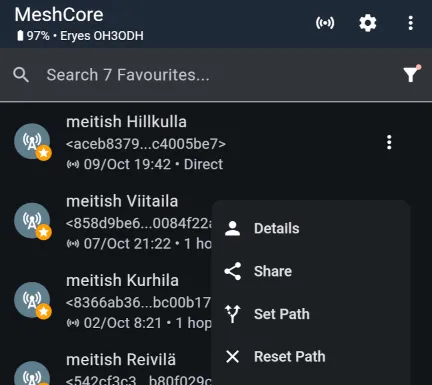
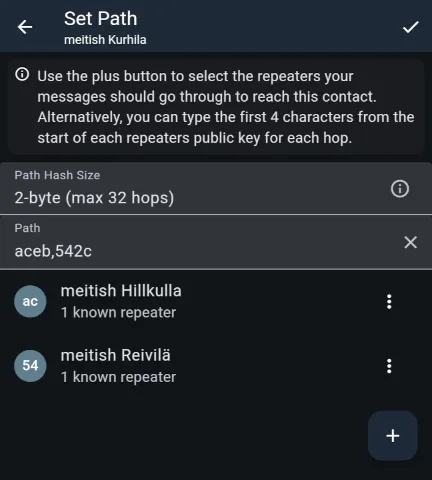
When managing over the mesh, it is sensible to define a path first for packets travelling between you and the repeater. Without a manual path, your login message floods the whole mesh before your companion radio receives a reply and starts using the return path.
Use the view shown below to set a path. The + button adds repeaters. You can also type comma-separated initial public-key byte pairs into the field. Specify only the outward path.
Managing from nearby reveals a limitation of the official app: connecting still forces a flood packet to be sent. Once the repeater replies directly, however, the connection becomes direct (the path shows Direct). You can then be confident that configuration is not adding unnecessary load to the mesh.